
Trial period
You can try our system, free of charge, for 30 days. During this period, you will be able to try all features of the platform and evaluate if it fits your needs. Please, keep in mind that some conditions apply,
Trial period is meant only for evaluation.
Trial period lasts 30 days, since space has been created and cannot be extended.
During trial period you will have only 5 seats
You are not required to provide payment information.
After trial period ends,
If no payment method is added, we will deactivate your space
If payment method is added, we will automatically switch your space to paid plan
You can upgrade to paid plan at any moment and lift any restrictions imposed by trial mode
Do not create multiple spaces in trial mode to perform the same evaluation (i.e., evaluation for the same institution, competition, etc.)
How to try a subscription
Trial subscription is available during onboarding process, when you are creating space. You can choose to try subscription when selecting a plan.
Cancelling trial subscription
If you haven't specified payment information, your subscription will be cancelled automatically, and your space will become deactivated. No, payment will be necessary.
If you have added payment information, you will have to cancel the plan explicitly, to avoid automatic renewal. Follow these steps to cancel your plan:
Go to console and choose a space
Go to Billing page
Click "Cancel plan"
When your plan is cancelled, you should see a message confirming, cancellation will take place at the end of the billing period (trial period). Additionally, "Next bill" and "Next payment due" widgets should show "-", confirming there are no upcoming payments planned for your space.
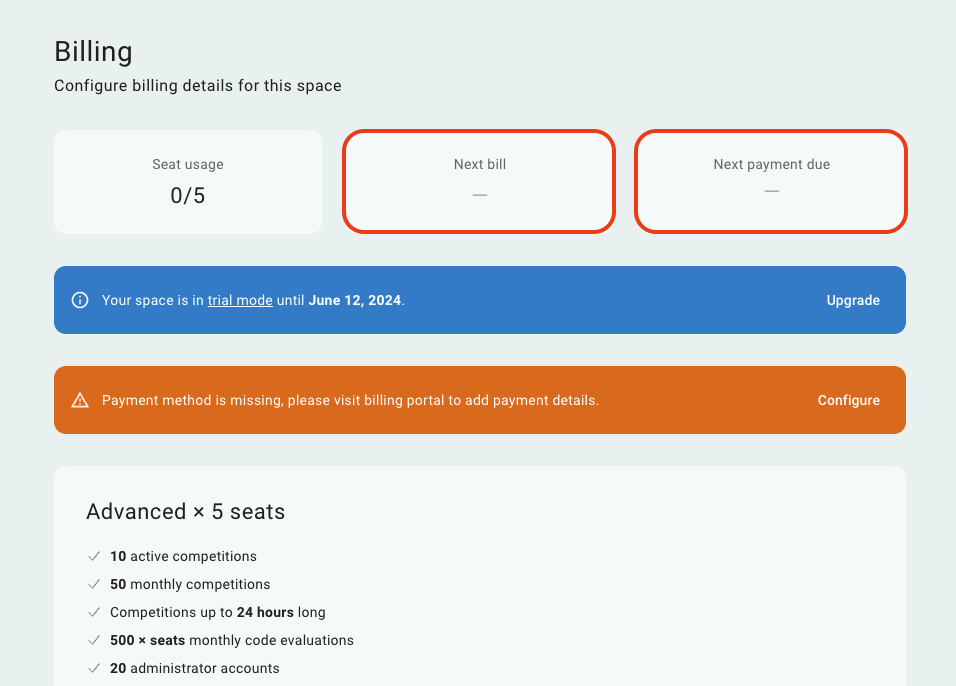
Billing page when renewals are not planned
Upgrading to paid subscription
You can upgrade your plan to paid version and lift all restrictions on billing page in your space.
Go to console and choose a space
Go to Billing page
Click "Switch to paid"
If you haven't added a payment method to your profile, our system will first redirect you to our billing portal (hosted by Stripe), there you will be able to security enter your payment information.
Once we have a valid payment method on file, you will be able to finish your trial period early and activate all seats and features.
Changing plan during trial period
You can switch between plans and change number of seats during your trial period. This allows you to try different plans and see which one fits you better.
Please note, during the trial period, the number of seats will always be limited to 5. The number of seats you specify in your plan will be applied when you switch to a paid plan.
 Stand with Ukraine