
Problem Checker
A problem checker is a special program used during the testing of solutions. It runs after the participant's program completes and determines whether their answer is correct. The checker has access to three files: the input file (input.txt), the expected answer file (answer.txt), and the participant's output file (output.txt).
Eolymp offers several built-in checkers, and you can also write your own custom checker in one of the supported programming languages.
How to Сonfigure a Сhecker
To set up a checker for your problem, follow these steps:
Open the console and select the space where your problem is hosted.
Navigate to the Problems section from the left menu.
Select the problem you want to modify.
Go to the Testing section within the problem menu.
Click on Checker to configure it.
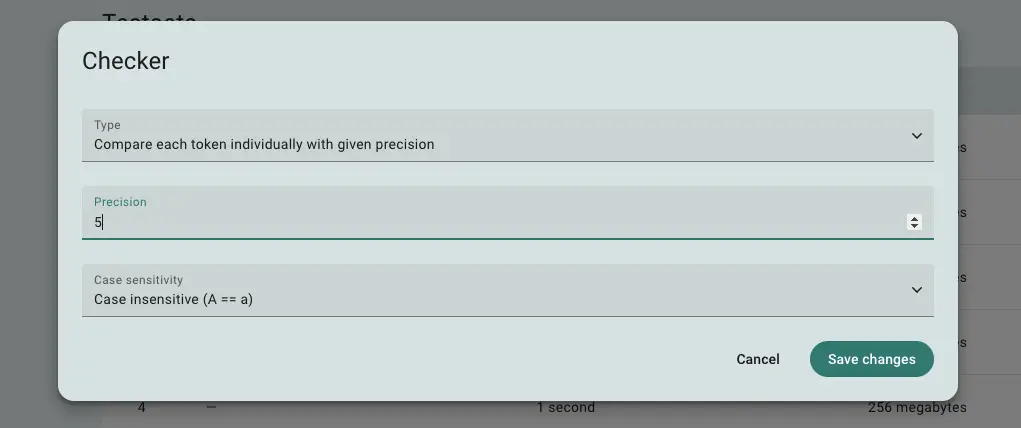
Fig 1. Checker configuration form
Types of Сheckers
No Сhecker
If you are using an interactor for grading, you can opt to disable the checker entirely. In this case, the interactor will determine whether the answer is correct. If no checker or interactor is set up, the testing process will result in an invalid outcome.
Line-by-line Сhecker
This checker compares the answer.txt and output.txt files line by line. If even a single character (byte) differs, the participant's answer will be marked as incorrect.
To make formatting easier for participants, the checker ignores:
Spaces and tabs at the end of each line.
Empty lines at the end of the file.
Use this checker when the participant's output needs to exactly match the expected answer, with no deviations (output.txt and answer.txt must be identical).
Token Сhecker
The token checker compares the answer.txt and output.txt files word by word or number by number. It determines the comparison method based on the data type in answer.txt. If answer.txt contains a number, output.txt must also contain a number; similarly, if answer.txt contains a word (string), output.txt must contain a word. Numbers are compared with a specified precision, and words are compared case-insensitively (e.g., "AA" == "aa").
When using this checker, you need to specify:
The precision for number comparisons.
Whether string comparisons should be case-sensitive.
The following formula is used to compare numbers:
Where:
is the participant's answer.
is the correct answer.
is the precision parameter specified in the problem.
If , the formula becomes . The system uses the long double (float64) data type for comparing numbers.
This checker is ideal for problems where you only need to compare meaningful tokens (words or numbers), ignoring whitespace and formatting. However, it may not be suitable for problems with large datasets, as it can be slow. In such cases, consider using the Line-by-line checker or a custom checker.
Custom Program Checker
You can also write your own custom checker using the "Compare using program" option. This checker runs after the participant's solution completes successfully, ensuring the system receives a complete output without errors, timeouts, or memory violations.
Your custom checker is compiled and run with the following arguments:
Input file (
input.txt).Participant's output file (
output.txt).Expected answer file (
answer.txt).
For example, the checker would be executed like this:
checker input.txt output.txt answer.txt
In C++, you can access these arguments via the main function's second parameter.
The checker communicates its verdict through its exit code:
Exit code | Meaning |
|---|---|
| Accepted — the output is correct. |
| Wrong answer. |
| Presentation error — the output is malformed. |
| Partially correct; see Partial scoring below. |
anything else | System failure — the checker itself is broken, or the problem's data is. |
If you use testlib, these are produced for you by the quit* family: quitf(_ok, ...), quitf(_wa, ...), quitf(_pe, ...) and quitp(points, ...). Use quitf(_fail, ...) when the jury's own data is at fault rather than the participant's output — a missing file, an impossible internal state, or an answer file that contradicts the input. It is reported as a system failure so that a broken problem is not mistaken for a failing submission.
Every path through the checker must end in one of these. A checker that runs off the end of main without a verdict is a system failure.
Partial scoring
To award part of a test's points rather than all or nothing, exit with code 7 and print the token points followed by the score. quitp(points, "message") does exactly that:
quitp(3.5, "matched %d of %d items", found, total);
The score is an absolute number of points, not a percentage, and it is capped at the test's own point value. A checker that returns a percentage therefore does not fail loudly — it silently awards full marks on every test worth less than that percentage, and the value it returns on the rest is clamped away.
To find the maximum a test may award, read the TEST_COST environment variable, which the judge sets for every checker run:
double max_points = atof(getenv("TEST_COST"));
quitp(max_points * fraction, "scored %.0f%%", fraction * 100);
Reading the maximum from TEST_COST keeps the subtask weights in the testset configuration, where they can be changed without touching the checker's source.
 Stand with Ukraine