
Violations
A violation is a record that a participant may have broken the rules of a contest — a solution copied from someone else, code the participant did not write, or a way of working through the round that does not look like solving problems unaided. Every contest has a Violations tab holding them.
A violation is only a record. It is filed as Pending and waits for a jury to confirm or dismiss it: nothing is decided automatically, nobody is disqualified automatically, and the scoreboard is not affected either way. Violations are visible only in the console.
Reading them needs permission to read contests; reporting, confirming, dismissing and deleting need permission to write them.
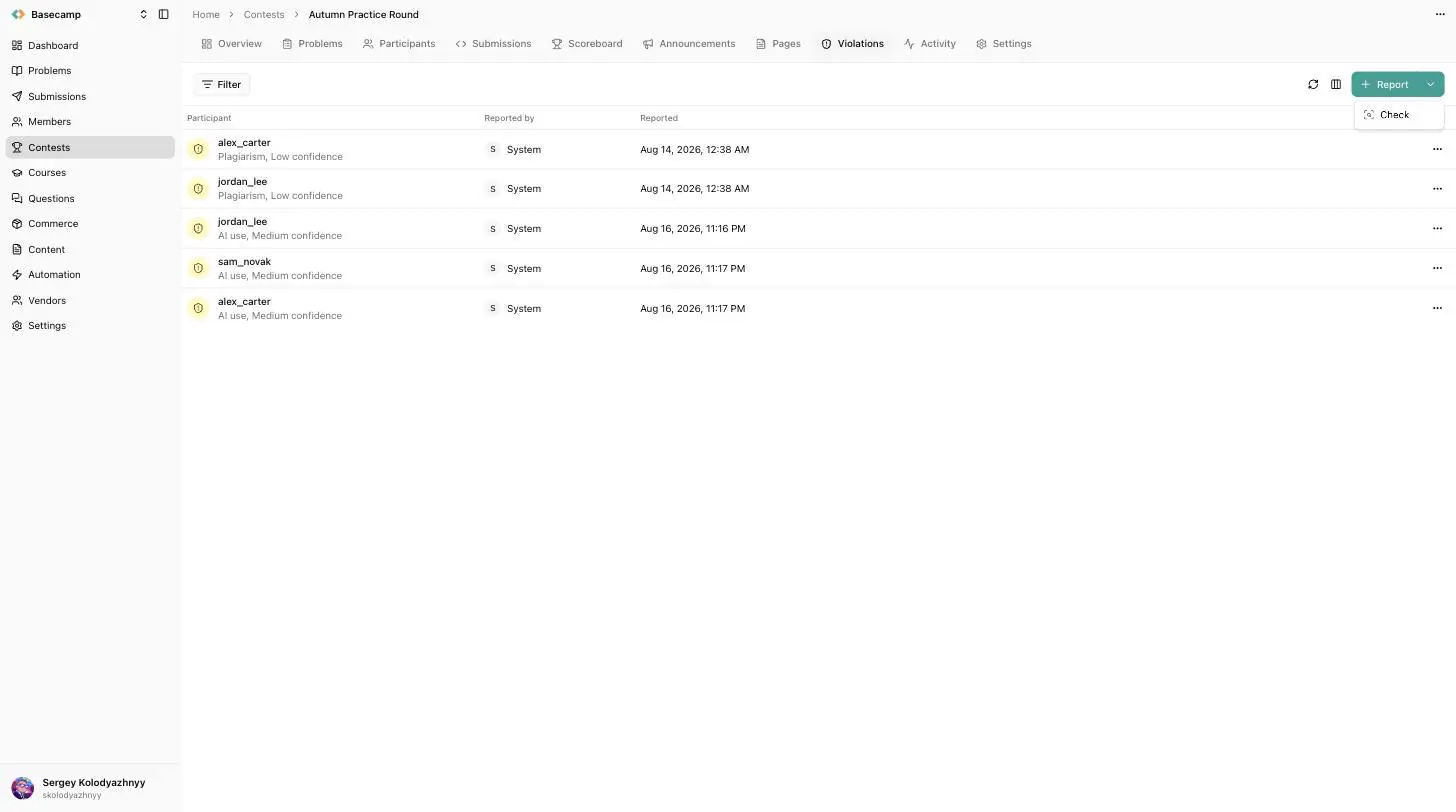
Fig 1. The Violations tab. Check sits in the menu beside Report.
Where violations come from
The automated check. Check — in the menu beside Report, and also on the contest header and the contest list row menu — analyses the contest and files a violation for each participant involved in a finding. It runs in the background, with a banner above the list linking to the contest's Activity tab, and it needs a plan that includes plagiarism analysis. If Check isn't offered, see Why a section is missing.
The jury. Report files a violation the analysis did not raise: pick the participant, pick the type, and write a summary of what happened in a sentence or two. It is filed as Pending under your name and behaves exactly like a detected one. The participant is notified that a violation has been reported against them.
When to run the check
Run it once the contest has ended. A check on a round that is still running sees less than a finished one would, and finding nothing at that point is not clearance. The console warns you when you start a check on a contest that has not finished.
The check is available while a contest is Open or Complete. A finalized contest is past the point of doing anything about a finding, so run the check and work through the results before you finalize.
Types
Plagiarism — code similarity between participants.
AI use — use of generative AI tools.
Behaviour — how the contest was worked through, judged against patterns that rarely arise from solving unaided.
Other — anything else. The default for a violation filed by hand.
Statuses and confidence
A violation is Pending when filed, and becomes Confirmed when the jury accepts the case or Dismissed when the jury rejects it. Dismissed violations stay on the list, so there is a record of what was looked at as well as of what was upheld, and both decisions are reversible from the same two buttons.
A participant's violation count includes pending and confirmed violations, but not dismissed ones. The Violations filter on the Participants tab uses that count, which makes it the list of everyone you have ruled against plus everyone still waiting — worth reading only after the queue is empty.
Automatically detected violations also carry a confidence of Low, Medium or High, showing how strong the finding is. A violation filed by the jury has no confidence value. Detection files loosely on purpose: a pending violation is a thing to look at, not an accusation, and confidence is the guide to which ones to read first.
The queue
The list holds one row per participant per finding: participant, with the type and confidence underneath and the status as a coloured icon, who reported it, and when. Type and confidence are also available as separate columns. It can be filtered by participant, status, type, confidence, and by whether the violation was raised automatically.
Filters are worth setting before you start reading, because the list becomes a queue: opening a case keeps the list beside it, and the arrows at the bottom of a case move to the previous and next violation without losing the filter.
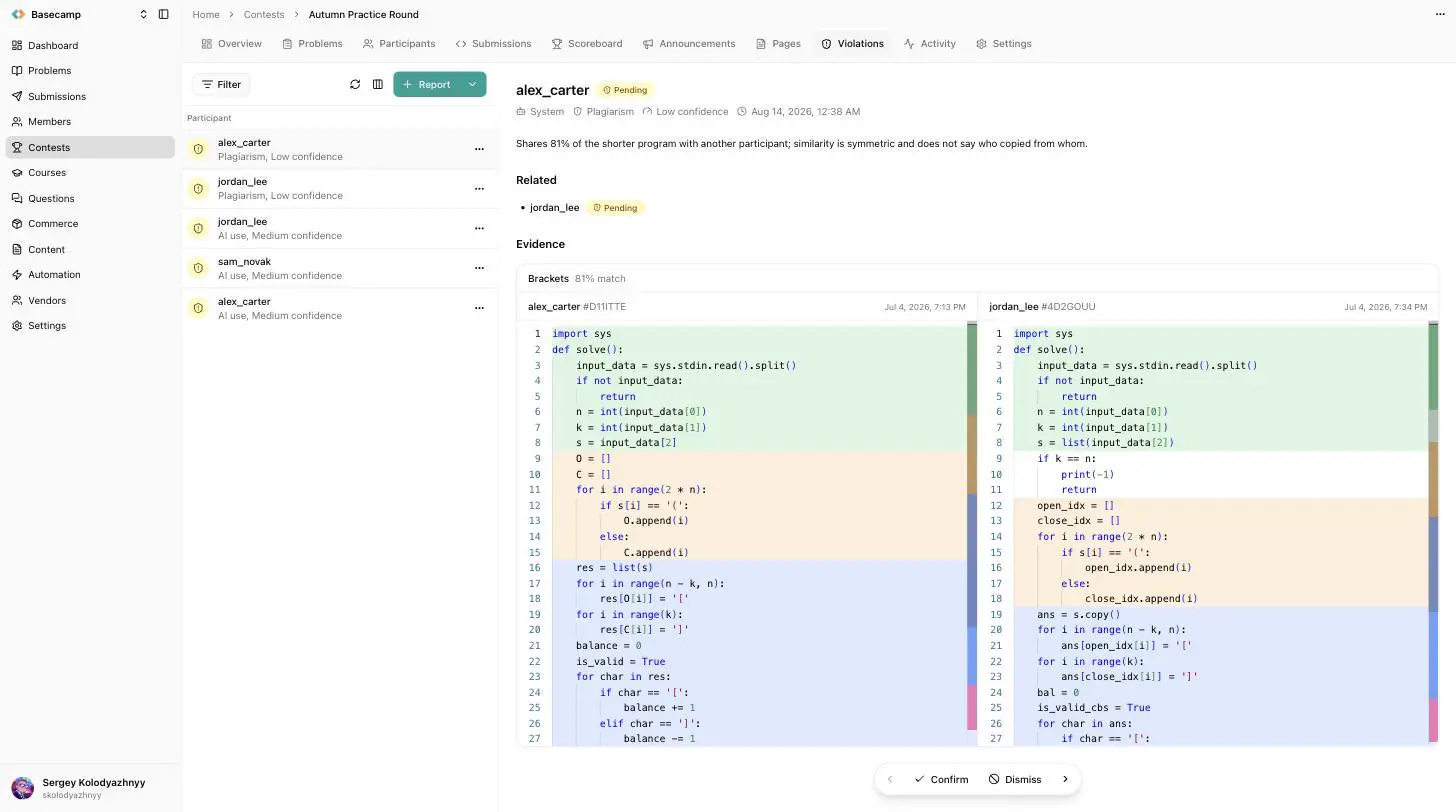
Fig 2. An open case, with the queue kept beside it. The two programs are shown side by side and the matching passages are marked.
A case
A case opens with the participant's name and the status, then who raised it — a jury member, or System for automatic detection — the type, the confidence and when it was reported. Below that is the summary, written as rich text; references inside it to submissions, participants and problems are rendered as links into the console.
A sticky bar at the bottom holds, left to right: previous case, Confirm, Dismiss, next case. There is no confirmation step, because the bar exists so a jury can work through a queue, and every decision it sets is reversible — pressing Confirm on an already confirmed case returns it to pending. Delete, from the row menu in the list, removes the violation and the decision on it for good; dismissing is almost always better, because it keeps the record.
Related cases
Copying names two people and is filed against each of them, so a decision on one is only half a decision. The Related section lists the other violations of the same case with their participant and status, one click away. Confirming one side says nothing about the other; open it and decide it separately.
Evidence
The material a case rests on, rendered according to what kind of evidence it is. Evidence cannot be edited: only the summary and the status of a violation can be changed, while the participant, the submissions it refers to and the record of who raised and who confirmed it are fixed.
Code comparison — for a match between two participants: the two sources side by side with the matching line ranges aligned and highlighted, headed by each participant's name, the submission and the time it was submitted. The percentage in the header is how much of the shorter of the two programs the pair shares.
Submission timeline — for behaviour findings: a scatter chart of the participant's attempts during the session, time along the horizontal axis, one row per problem, each attempt coloured by its verdict. The card names what was measured and the value it reached, so you can judge for yourself whether the pattern is suspicious or simply a strong round.
Rewrite — the timeline on top and, below it, a diff of an attempt against the participant's previous attempt at the same problem, labelled with how much changed and how far apart the two were. Arrows step through the attempts.
Single submission — one program on its own, read-only, with its problem and submission time.
What the analysis looks for is not published. It is deliberately loose, so a finding is a candidate to review rather than a conclusion.
What a clean check means
The check does not cover everything, and it is not meant to be conclusive on its own. Treat a clean result as "nothing was flagged", not as "nobody cheated", and a finding as something to look at rather than a verdict.
Violations and disqualification
They are separate, and confirming a violation is not a punishment. A confirmed violation records a decision and leaves the participant in the contest and on the scoreboard; the confirmation dialog says so outright.
Disqualification is a flag on the participant, set from the participant's page with a reason recorded alongside it, and it is what actually changes the standing: a disqualified row loses its official rank, is struck through on the board, and disappears from it entirely when Hide disqualified is on.
A violation and a disqualification are recorded independently, so a jury can confirm a case without disqualifying, or disqualify for a reason that never became a violation.
 Ukrayna ilə durun