
Contests
A contest is a container in which participants solve a series of problems. It lives inside a space, draws its problems from the space's problem library and its people from the space's members, and it runs the same way whether it holds a practice session of six people or an olympiad of tens of thousands.
Everything under Contests needs permission to read contests, and almost every change needs permission to write them — contest pages are the exception and follow content permissions instead. If an action you expect is missing from a menu, it is either the permission or the contest's status that hid it; see Why a section is missing.
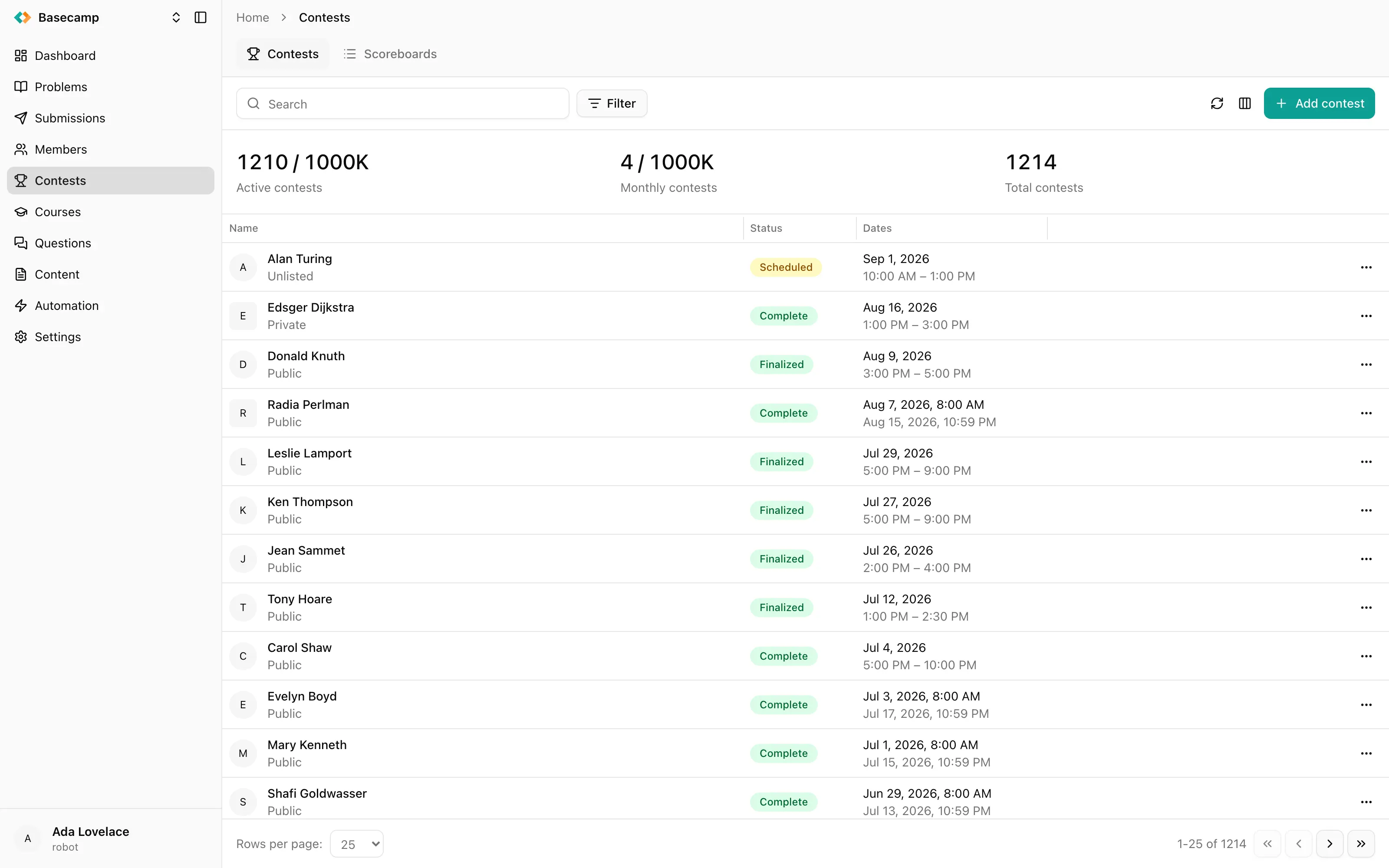
Fig 1. The contests list, with the usage counters above it.
The contest list
Contests opens on the list of the space's contests, one row per contest. Above it sit two tabs — Contests, this list, and Scoreboards, which holds the scoreboards that add several contests together.
Name, status and dates are shown by default. The column customizer adds the rest: series, country, format, duration, number of problems, number of participants, whether editorials are shown after the contest, whether upsolving is allowed, whether new participants may join after the end, whether the contest is rated, and its difficulty. A contest that starts and ends on the same day shows that date once with a time range.
Free-text search matches the contest name. You can filter by ID, status, visibility, start time, end time, series and member — the last one narrowing the list to contests a particular person takes part in. Sorting defaults to start time.
Three counters above the list show what the space has used against its plan: active contests and monthly contests, each as used-of-quota, and the total number of contests. When a limit is reached, creating another contest is refused even with the right permission.
What makes up a contest
Four choices shape a contest, and two of them are hard to change later:
Format — IOI or ICPC. It decides how scores and ranks are computed, and it is locked once the first submission arrives.
Participation mode — everyone competing together, or each participant on their own clock.
Visibility — who can find the contest and join it, below.
Schedule — when it starts, when it ends, and how long one participant gets.
Everything else — problems, participants, the scoreboard, announcements — can be changed while the contest is being prepared and, for the most part, while it runs.
Visibility
Visibility decides who can see the contest and join it on their own. It is set when the contest is created and can be changed at any time from Settings → General.
Visibility | Who can take part |
|---|---|
Public | Announced on the space's website; anyone can join |
Unlisted | Not listed anywhere; anyone with the link can join |
Private | Only people an organizer adds explicitly |
People added explicitly always see the contest and take part in it, whatever the visibility says.
There is no draft status. A contest is created Scheduled, and a Private or Unlisted contest that has not started yet is how a contest is prepared before it is announced.
A contest's screens
Opening a contest gives it its own tab strip:
Tab | What it holds |
|---|---|
Overview | The status of the contest and its ten most recent submissions |
Problems | The problems in the contest, in contest order — see Contest problems |
Participants | The roster — see Participants and Let people join a contest |
Submissions | Every submission made inside the contest |
Scoreboard | The standing — see Contest scoreboard |
Announcements | Messages to everyone taking part — see Announcements |
Pages | Custom content shown to participants — see Contest pages |
Violations | Integrity findings — see Violations |
Activity | The contest's background jobs |
Settings | Everything configurable about the contest |
Two things that decide how a contest ends are not tabs of their own. Medals are set on one participant at a time, from that participant's page, and finalizing the results is an action in the contest header — and both have to happen in that order, because finalizing locks the medals.
The header above the tabs carries the contest name, the lifecycle actions described in Open, freeze, suspend and close a contest, a link that opens the contest on the space's public site, Copy, Delete, and one entry for each automation rule that can be run against a contest.
Activity
Some things a contest does take long enough to run in the background: retesting every submission for a problem, rebuilding the scoreboard, checking the contest for plagiarism. All of them return as soon as the job is queued, and the Activity tab is where you follow them. Each row shows the job type, its status, how far it got, when it was created and when it finished, and the row menu downloads the job's log where there is one.
The Problems tab shows a banner while a retest is queued or running, with a link here.
Settings
Settings holds five cards — General, Participation, Scoreboard, Rating and Other. Every field saves on its own the moment you change it; there is no page-level Save button.
The individual settings are described on the pages they belong to: format and visibility in General, the schedule and the participation rules in General and Participation, scoreboard visibility and freezing in Scoreboard, and certificates, classification, printing and the contest's programming languages in Other.
Rating appears only if your plan includes rating. Turning Rated on recalculates participants' EloMMR ratings once the contest is finalized, and Maximum rating leaves participants above a given rating out of that calculation.
Programming languages default to "Same as in space" — the contest allows everything the space allows. Turning that off narrows the contest to a list you choose. The languages a participant can pick from are the intersection of what the problem allows and what the contest allows, so a contest can bar a language the problem permits.
Deleting a contest
Delete removes the contest permanently, together with its participants, submissions and results. There is no restore.
If what you want is to take a finished contest out of sight while keeping what happened in it, change its visibility to Private instead. The results, the scoreboard and the submissions stay where they are, and only people you added can still reach it.
 Ukrayna ilə durun