
Problem Statement
A problem statement is a text document that clearly explains the task, outlines the constraints, and specifies the input/output formats required for solving the problem. It also provides any additional details necessary for participants to understand the challenge.
On Eolymp, problems can have multiple statements in different languages, allowing participants to access the information in their preferred language.
How to Create a Statement
To create or edit a problem statement, follow these steps:
Open the console and choose the space where the problem is hosted.
Navigate to the Problems using the left menu.
Select the problem you want to edit, or create a new one.
Navigate to the Statements using the problem menu.
You can add a new statement by clicking "Add statement" at the top of the interface. To edit an existing statement, select it from the list.
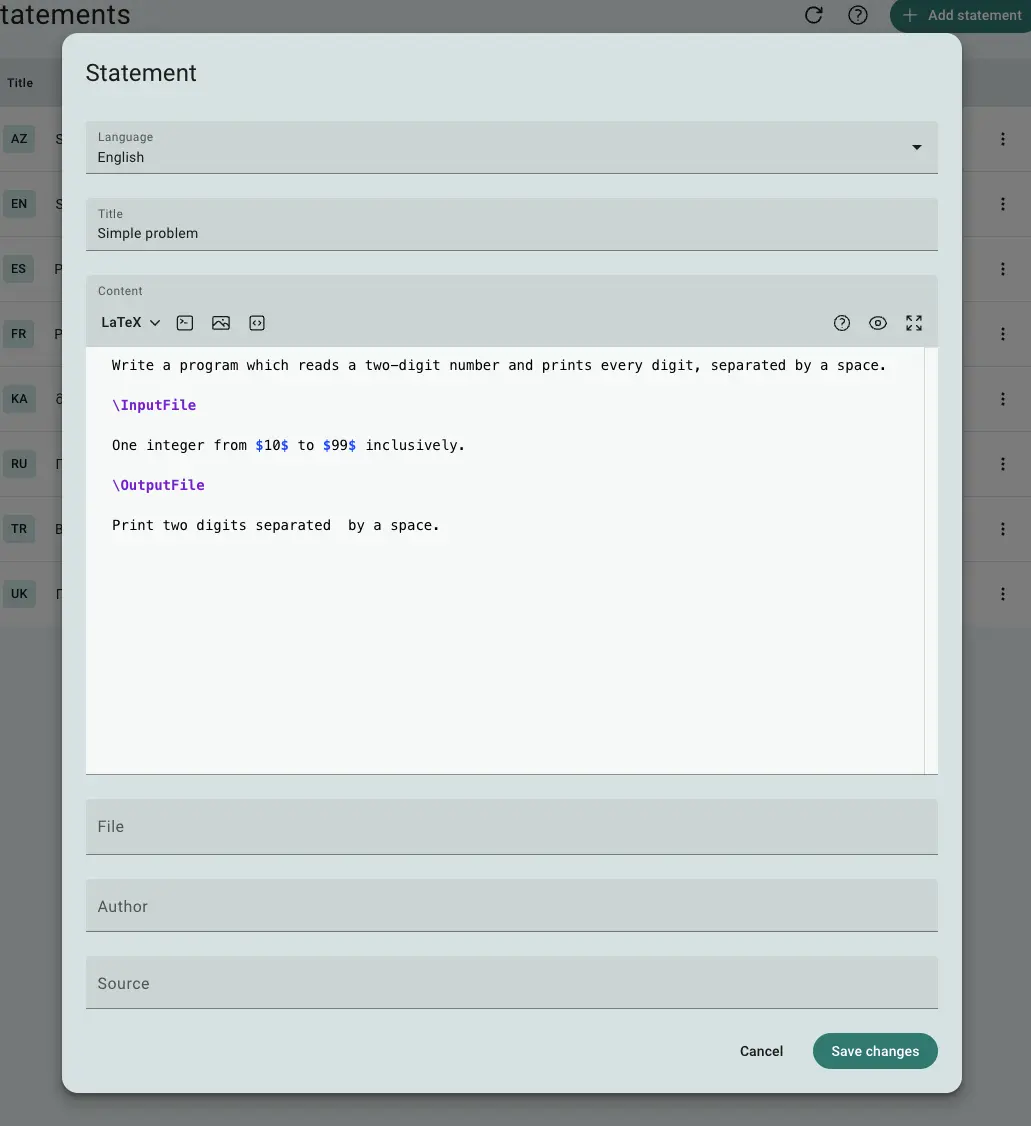
Fig 1. Problem statement form
In the statement editor, you can define key elements like the title, statement, source, and author information. If the problem was used in an official competition, you can also upload a PDF of the original statement, which will appear as a downloadable link for participants.
How to Write a Problem Statement
A well-crafted problem statement should include several key sections:
Introduction: A concise explanation of the problem's goal. This section sets the context for the task without giving away any hints about how to solve it.
Input: Provide a detailed description of the input format. Specify any constraints on the input values (e.g., ). Clear input guidelines help participants avoid confusion and make their solutions more efficient.
Output: Clearly describe the expected output format. If there are multiple correct outputs, explain which one the participants should submit (e.g., the smallest value, or any valid solution).
Interaction Protocol (for interactive problems): In interactive problems, the input and output are exchanged dynamically. Explain how the solution will interact with the interactor, detailing the "conversation" between the solution and the system. For instance, in a guessing game, the interactor might provide feedback like "too low" or "too high" after each guess.
Examples: This section presents input and output examples to help participants understand what the data looks like. This section is automatically generated and displays tests marked as examples.
In some cases, you may want to include additional sections:
Scoring: If the problem involves partial scoring (e.g., where certain sub-problems yield different scores), describe how points are awarded for each testset.
Notes: For more complex problems, provide detailed explanations for the examples to show how the output was calculated. This helps participants understand the problem logic more clearly.
Formatting
Statements should be written in either LaTeX or Markdown. These formats support rich text and mathematical expressions, ensuring that complex formulas or data are clearly presented.
You should also use special markers to define sections within the statement. These markers help the system organize and display the content coherently. Each marker starts with a backslash (\) and is placed on its own line, with blank lines before and after.
Marker | Description |
|---|---|
\InputFile | Marks the beginning of the input data description. |
\Interaction | Marks the beginning of the interaction protocol (for interactive problems). |
\OutputFile | Marks the start of the output description. |
\Examples | Marks the start of the examples section. |
\Note | Marks the beginning of the explanation section for examples. |
\Scoring | Marks the section that explains the scoring algorithm. |
These markers work in both Markdown and LaTeX. Here is an example of a statement with markers:
Everything before the first marker is the introduction.

\InputFile

This section describes the input format.

\OutputFile

This section describes the output format.
Best Practices
A good problem statement is both clear and comprehensive. Here are some tips to ensure your statement is well-structured and participant-friendly:
Be explicit: Avoid ambiguity by clearly defining terms and constraints. If the problem involves processing words, for instance, clarify what qualifies as a word (e.g., how punctuation or hyphenation is handled).
List all constraints: Ensure participants are aware of all constraints. Being vague or omitting constraints (e.g., not specifying how punctuation is treated) can lead to frustration. Remember, the challenge should be in solving the problem, not guessing the problem's requirements.
Use clear examples: Provide multiple input/output examples with a brief explanation of how the outputs are derived. Examples help participants verify their understanding of the problem requirements.
Organize logically: Stick to a clear structure: Introduction, Input, Output, and any specific sections like Interaction Protocol for interactive problems. Consistency helps participants navigate the statement more easily.
Examples
Simple Problem – Example of a typical problem statement.
Guess the Number – Example of an interactive problem with a scoring section.
By following these guidelines, you’ll create problem statements that are engaging, clear, and challenging, while still providing participants with the information they need to solve the problem effectively.
 Stand with Ukraine