
Customize navigation
The menu on your space's site is itself a page. Create one at the root with the slug nav and its content becomes the menu: you choose the entries, their order, their labels and their icons, and the standard menu is replaced by yours.
Creating the page needs permission to change content.
Create the navigation page
Open Content → Pages in the console and press Add page. The page is created at the root.
In Page settings, set the Slug to
nav. The title is not displayed; "Navigation" does the job.Write the content as one or more lists of links, as described below. The page saves as you type.
Once the page exists it replaces the site's own menu. Delete the page to go back to the standard one.
What the content has to be
The page is read as an ordinary document. Every list item that contains a link becomes a menu entry, using the link's target and the item's text, and formatting inside the item is ignored. The content may hold more than one list, and each list becomes its own group of entries.
- [Item 1](/item1)
- [Item 2](/item2)
- [Item 3](/item3)
Link targets may be one of the standard site sections, another of your pages, or an external address:
Target | Where it goes |
|---|---|
| The list of problems |
| The list of contests |
| The list of posts |
| The page served at that address |
| An external address, marked as external |
Icons
Each entry gets an icon chosen automatically, and you can name one instead by writing it between colons before the label:
- [:star: Sponsors](/sponsors)
Icon |
|---|
|
|
|
|
|
|
|
|
|
|
|
|
An image in the list item is used instead of an icon, which is how sponsor logos get into a menu. SVG works best.
-  [Sponsor](https://www.eolymp.com)
A complete example
- [Home](/) - [Details](/details) - [Schedule](/schedule) - [Contests](/contests) - [Information](/info) - [:star: Sponsors](/sponsors) - [:envelope: Contact](/contact) --- -  [Sponsor 1](https://www.eolymp.com) -  [Sponsor 2](https://www.eolymp.com)
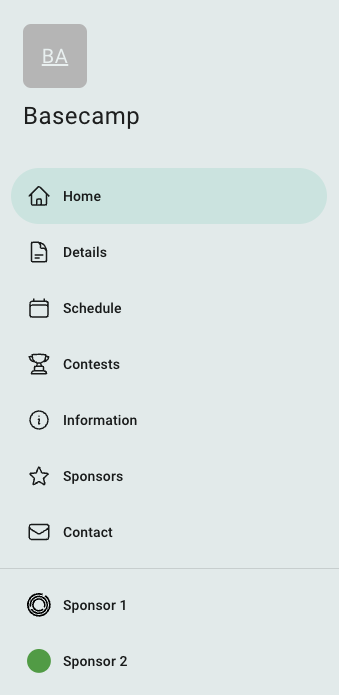
Fig 1. The menu that content produces on the space's site.
 Apoye a Ucrania