
How to Suggest Changes
If you spot an error in a statement or notice a problem that's missing a translation, you can help improve the site by suggesting changes or translations.
To suggest a change, visit the problem page on the basecamp site and click the small flag icon under the problem name.
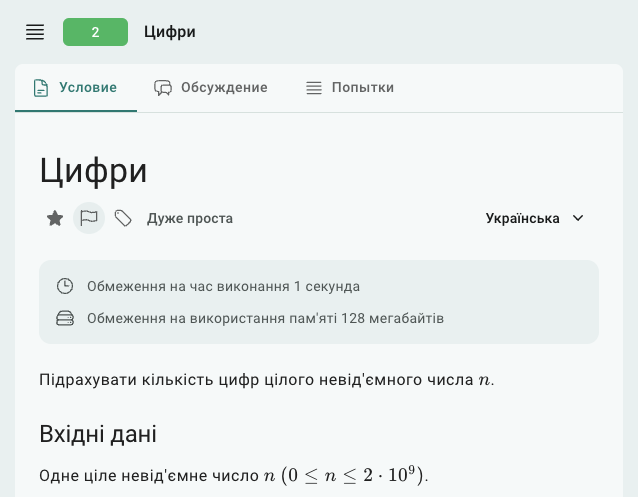
Once you click the flag, you can choose what you'd like to change:
Suggest topics or difficulty level — Recommend topics or an overall difficulty level for the problem.
Suggest a change to the statement — Propose changes to the problem statement, like fixing errors or formatting.
Translate to another language — Offer a translation of the problem statement into another language.
Suggest a tutorial — Share a tutorial or an explanation of how to solve the problem.
All suggested changes will go through a moderation process before being published on the site.
Formatting
Statements and tutorials should be written in either LaTeX or Markdown. There's no strong preference for one format over the other, so you can use whichever you prefer. The following formatting rules should be followed:
All numbers, variables, constraints, and mathematical formulas should be in math mode (i.e., wrapped in
$..$or$$..$$). For example, to describe a variableN, use this markup:$N$ $(0 < N \le 10^8)$, which will appear as . Sequences of numbers can be written like this:$a_0, a_1, ..., a_{N-1}$, which will appear as .Standard sections like input, output, and scoring should use the appropriate commands:
\InputFile,\OutputFile,\Examples,\Iteration,\Scoring,\Note.Non-standard sections should use second-level headings: In LaTeX, this is done with
\subsection{...}, and in Markdown, use## ....When describing formats (e.g., "output the answer in the format ..."), function names, or inline code, use fixed-width formatting: In LaTeX, you can use
\texttt{..}or\verb|...|, and in Markdown, use`...`.For larger code blocks or sections of code, use fixed-width blocks: In LaTeX, this is done with the
lstlistingenvironment (\begin{lstlisting}[language=C++]...\end{lstlisting}), and in Markdown, use triple backticks (```cpp ... ```).
Tutorials
When suggesting a tutorial, it’s important to provide a detailed explanation of the solution, not just code. A good tutorial should clearly explain the steps to solve the problem, describe the thought process behind the solution, and highlight key concepts. Simply including code without explanation will not be sufficient. Tutorials that include both code and clear explanations are much more helpful to users looking to understand the solution.
Statement Example
Let's look at an example from problem #11500 Book Shop:
You are in a book shop which sells $n$ different books. You know the price and number of pages of each book.

You have decided that the total price of your purchases will be at most $x$. What is the maximum number of pages you can buy? You can buy each book at most once.

## InputFile
The first line contains two integers $n\:(1 \le n \le 1000)$ and $x\:(1 \le x \le 10^5)$: the number of books and the maximum total price.

The next line contains $n$ integers $h_1, h_2, ..., h_n\:(1 \le h_i \le 1000)$: the price of each book.

The last line contains $n$ integers $s_1, s_2, ..., s_n\:(1 \le s_i \le 1000)$: the number of pages of each book.

## OutputFile
Print one integer --- the maximum number of pages.

## Note
You can buy books $1$ and $3$. Their price is $4 + 5 = 9$ and the number of pages is $5 + 8 = 13$.
Notice how the system automatically arranges sections: input and output sections come before the examples, and the note (which explains the example) is placed at the end. The system aims to organize sections in a consistent and predictable way to make things easier for users.
 Stand with Ukraine