
Contest scoreboard
The Scoreboard tab is the ranked table of a contest's participants: one row per participant, one column per problem, a total, and a rank. It is built from the submissions recorded in the contest, in the shape the contest format dictates, and clicking a row opens that participant's page.
The board describes itself: the modes and columns offered come from the contest, so a contest with no freezing time offers no frozen board and a contest without upsolving offers no upsolve board.
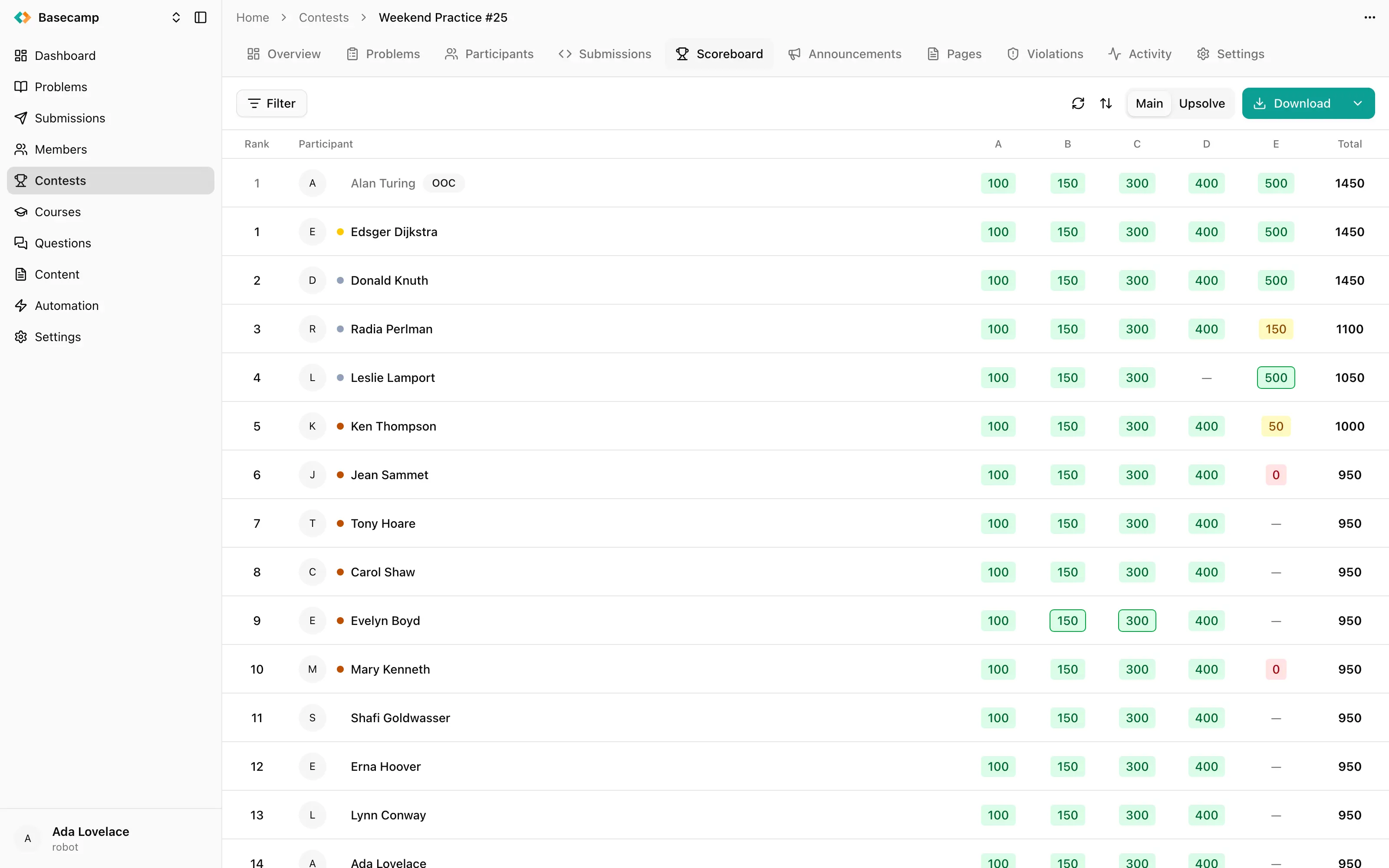
Fig 1. A contest scoreboard, with the mode switch and filters above it.
Views of the same contest
The mode switch in the toolbar decides which recorded scores the rows are built from. Only the modes a contest actually offers appear, and when there is only one the switch is hidden. The choice is kept in the page's address, so a particular view is a link you can send to someone.
Results — scores earned during contest time. The default.
Frozen — the standing as it stood at the freezing moment. Offered only when the contest sets a freezing time.
Upsolve — the standing counting submissions made after the contest in upsolve mode. Upsolve scores are recorded separately and never affect the official ranking.
Virtual — each participant on their own clock, for contests where people start individually. Sorting, first-to-solve marks, pending markers and the second rank column are not computed here, and this view can be neither sorted nor exported.
Rank, ties and rows that don't count
Two ranks are kept for every row. The official rank covers only officially ranked participants and is unset for rows that are unofficial or disqualified. The overall rank covers everyone, including unofficial and disqualified rows, and is always set. The rank cell shows the official rank where the row has one, and otherwise the overall rank in muted type.
Tied participants share a rank range: a row tied with two others at position 3 shows 3–5.
The rows themselves are marked:
Unofficial rows are muted and carry an OOC badge.
Disqualified rows are struck through — or are missing entirely, if Hide disqualified is on.
A medal shows as a coloured dot before the name.
A participant is on the scoreboard from the moment they register, with an empty row, rather than only after their first submission.
Sorting by a problem column reorders the page without touching the stored ranks. In that case the rank cell shows the position in the current ordering, with the standing underneath it.
What a cell says
Each problem cell reports one participant's result on one problem, formatted for the contest's format.
In an ICPC contest, a solved problem shows the minutes it took, plus +N when there were N failed attempts, in green. A problem attempted but not solved shows −N, the number of attempts, in red. A problem never attempted shows an em dash.
In an IOI contest the cell is the score: green at full score, yellow for partial credit, red for zero with attempts made.
Two markers appear on both:
A green outline marks the first participant to solve that problem.
A grey cell with
?, usually with a count, marks a cell whose visible value is stale: the board is frozen and attempts were made after the freezing moment. It shows the frozen value next to the?when there was one, and only the?when the problem had no result at the freeze. A problem solved after the freeze reports no pending attempts, because attempts stop counting once a problem is solved.
Attribute columns
Settings → Scoreboard → Attributes adds member profile fields as columns on the scoreboard, such as school, grade or the member's country. Each column takes an optional Label for its header; left empty, the profile field's own label is used. Columns can be reordered, and removing one leaves the members' values untouched. Countries and regions are shown with their names and flags.
Who may look at it
Settings → Scoreboard → Visibility has three values:
Visibility | Who sees the board |
|---|---|
Invisible | Organizers only |
Internal | Participants and organizers |
Public | Everyone, including visitors to the contest's public page |
Two more settings on the same card change what participants see rather than who:
Blur results hides results in the participant interface, so a competitor at an onsite contest cannot read a neighbour's screen. The participant can reveal their own deliberately.
Hide disqualified leaves disqualified participants out of the board entirely instead of showing them struck through.
The filter bar above the board itself has Official, restricting it to officially ranked participants, and Disqualified, showing or hiding disqualified rows — for your own reading, not for anyone else's.
Tie breaker
Tie breaker, on the same settings card, adds one criterion for participants who end on the same score. None leaves them tied; Last submission ranks the participant whose last score-changing submission came earlier above the one who improved later.
It is locked once the contest is finalized, as are the attempt penalty and the freezing time.
Download
Download exports the board in the view currently selected and starts the download. It is not available in Virtual mode. The export is generated on request and heavily rate-limited, so a burst of repeated exports is refused — take one copy and keep it.
Rebuild
Rebuild recomputes every participant's score from their submissions. It asks for confirmation, then runs in the background, and a banner at the top of the tab links to the contest's Activity tab where you can follow it.
This is a repair, not a cache refresh. Use it when the standing has drifted from the submissions behind it — after problems were retested, after tests were edited, after submissions were deleted or restored — and expect it to take real time on a large contest. Rebuilding needs permission to write contests.
Beyond one contest
A standing that spans several contests — a season table, a multi-day olympiad — is a separate scoreboard that adds the contests together.
 Stand with Ukraine